

Autocut
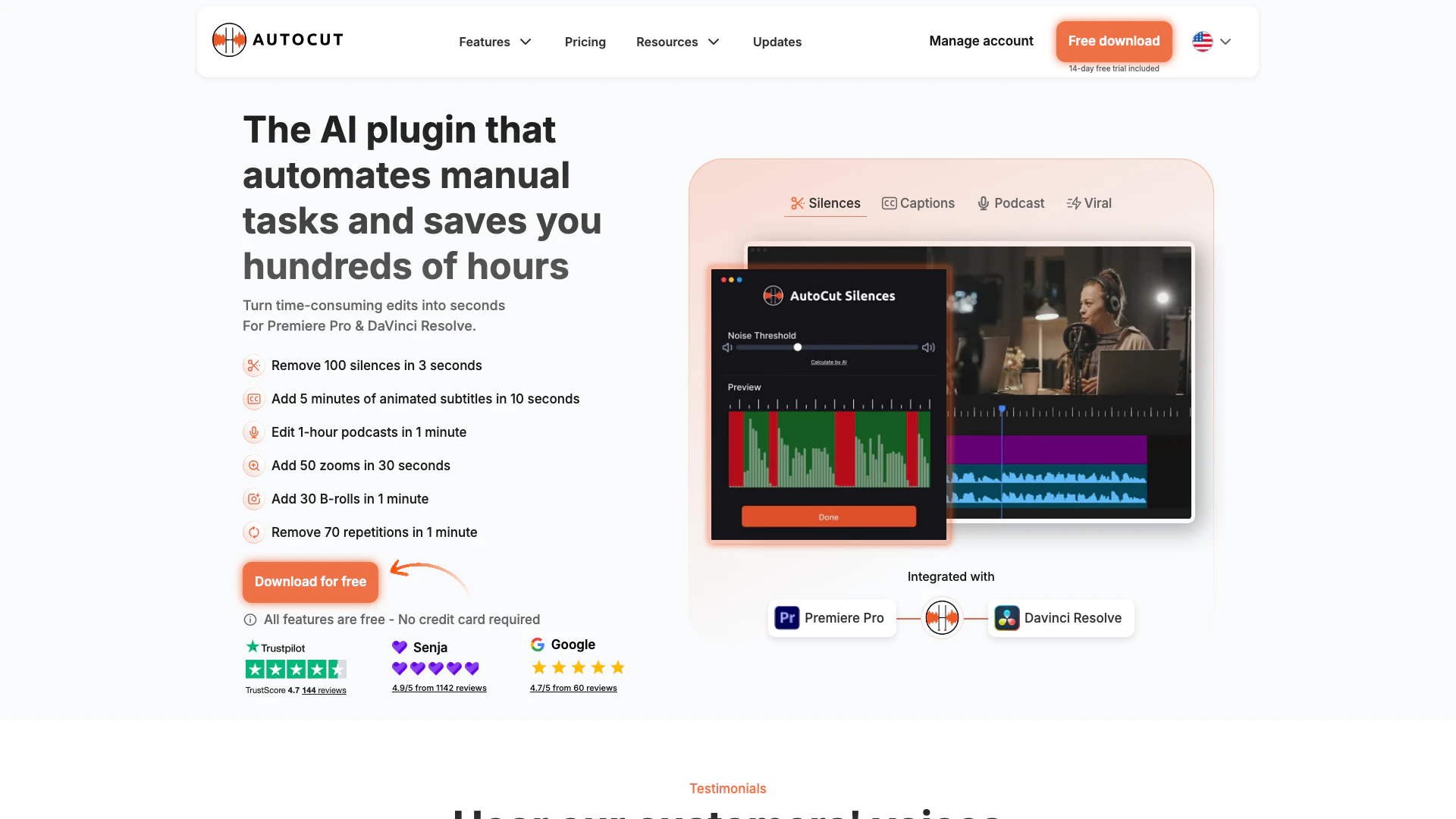




What is AutoCut?
AutoCut is an innovative AI-powered plugin designed specifically for video editing[1] in Premiere Pro[2] and DaVinci Resolve[3]. It automates various time-consuming tasks such as removing silences, adding captions, and integrating B-rolls, significantly enhancing the efficiency of the editing process. By leveraging advanced AI technology, AutoCut allows editors to focus on creativity rather than repetitive manual tasks, making it an essential tool for both novice and professional video creators.
How to use AutoCut?
- Install the Plugin: Download AutoCut from the official website and install it into your Premiere Pro or DaVinci Resolve software.
- Import Your Video: Open your video project and import the footage you want to edit.
- Select AutoCut Features: Choose the specific features you want to use, such as removing silences, adding captions, or applying auto-zoom[5]s.
- Apply AI Functions: Use the AutoCut interface to apply the selected AI functions to your video. For example, to remove silences[4], simply click on the 'AutoCut Silences' feature.
- Review and Export: After applying the desired edits, review your video for any final adjustments and then export it to your preferred format.
What are the main features of AutoCut?
- AutoCut Silences: Instantly removes silences from your videos to enhance engagement.
- AutoCaptions: Automatically generates and translates captions, improving accessibility.
- AutoZoom: Adds dynamic zooms to enhance storytelling and viewer engagement.
- AutoB-Rolls: Integrates stock footage seamlessly into your edits.
- AutoCut Podcast: Automates editing for podcasts, including speaker recognition and camera switching.
- AutoRepeat: Identifies and removes repeated content, preserving only the best takes.
- AutoResize: Adapts video dimensions for various social media formats.
- AutoProfanity Filter: Masks inappropriate language with sound effects.
- AutoViral: Extracts key segments from longer videos to create engaging short-form content.
- AutoChapters: Automatically segments videos into chapters for easy navigation.
Who is AutoCut for?
AutoCut is designed for video editors of all skill levels, from beginners to seasoned professionals. It is particularly beneficial for content creators, YouTubers, and podcasters who require efficient editing solutions. The plugin is ideal for those using Premiere Pro or DaVinci Resolve, looking to save time on repetitive editing tasks and enhance the quality of their videos.
What are the use cases of AutoCut?
- YouTube Video Editing: Quickly edit and enhance YouTube videos by removing silences and adding captions, making the content more engaging.
- Podcast Production: Streamline the editing process for podcasts by automating speaker recognition and camera switching for multicam setups.
- Social Media Content Creation: Utilize AutoCut to create short, impactful videos from longer content, perfect for platforms like Instagram and TikTok.
Product Images






Autocut Pros and Cons
Pros
- AI-Powered Editing Features: AutoCut offers advanced AI-driven features like AutoCaptions, AutoCut Silences, and AutoZoom, which automate tedious editing tasks, saving time and enhancing video quality.
- Time Efficiency: The tool significantly reduces editing time, allowing users to perform tasks like removing silences or adding captions in mere seconds, which is ideal for busy video editors.
- Seamless Integration: AutoCut integrates smoothly with popular video editing software like Premiere Pro and DaVinci Resolve, making it easy for users to enhance their workflow without major adjustments.
Cons
No cons data detected for this tool
Autocut Pricing
Basic Plan
Includes only our historical feature, Silences removal.
AI Plan
Unlocks all 10+ AI-powered editing features.
Enterprise Plan
Designed for agencies, small teams, and large organizations with centralized license management and priority support.
For the latest pricing, please visit this link: https://www.autocut.com/en/pricing/
Prices are subject to change. Please visit the official website for the most up-to-date pricing information.
Analytics of Autocut
Autocut Compare
| Tool Name | Introduction | Pricing | Type | Rating | Launch Date | Learn more |
|---|---|---|---|---|---|---|
 | za88 หวยออนไลน์ ครบทุกหวยในเว็บเดียว ไทย ลาว ฮานอย จ่ายหนัก ไม่มีเลขอั้น ลุ้นได้ทุกวัน โอนจริง จ่ายไว มั่นใจได้ทุกบิล แทงหวยง่าย ๆ 2025 | Free | 💼Work | August 18, 2025 | Get deal | |
 | Effortlessly manage tasks using voice commands with Whisprlist. | Free | 🙋♂️Personal💼Work | September 24, 2024 | Get deal | |
 | Transform customer complaints into business opportunities. | Free | 💼Work🎨Creativity | November 29, 2025 | Get deal |
Info current as of post date. Offers and availability may vary by location and are subject to change.
Autocut Q&A
To install AutoCut plugin, you need Premiere Pro 2023, 2024, 2025, 2026 or DaVinci Resolve 18.6 or 19+ (both the free and paid versions work). Follow our step-by-step tutorial here.
For more FAQs, please visit this link: https://knowledge.autocut.com/en/
Autocut Alternatives
- Video & Animation
- AI Video Editor
- AI Video Generator

Animaker is an online AI animation generator and video maker that brings studio quality video content within everyone's reach. Animated Videos, Done Right!
- Video & Animation
- AI Video Editor
- AI Video Generator
Introducing NUI the Natural User Interface, aimed at revolutionizing how people interact with anything digital leveraging the power of AI
- Image Generation & Editing
- AI Image Generator
- AI Image Recognition
- AI Design Generator