
Dojoclip





What is Dojoclip?
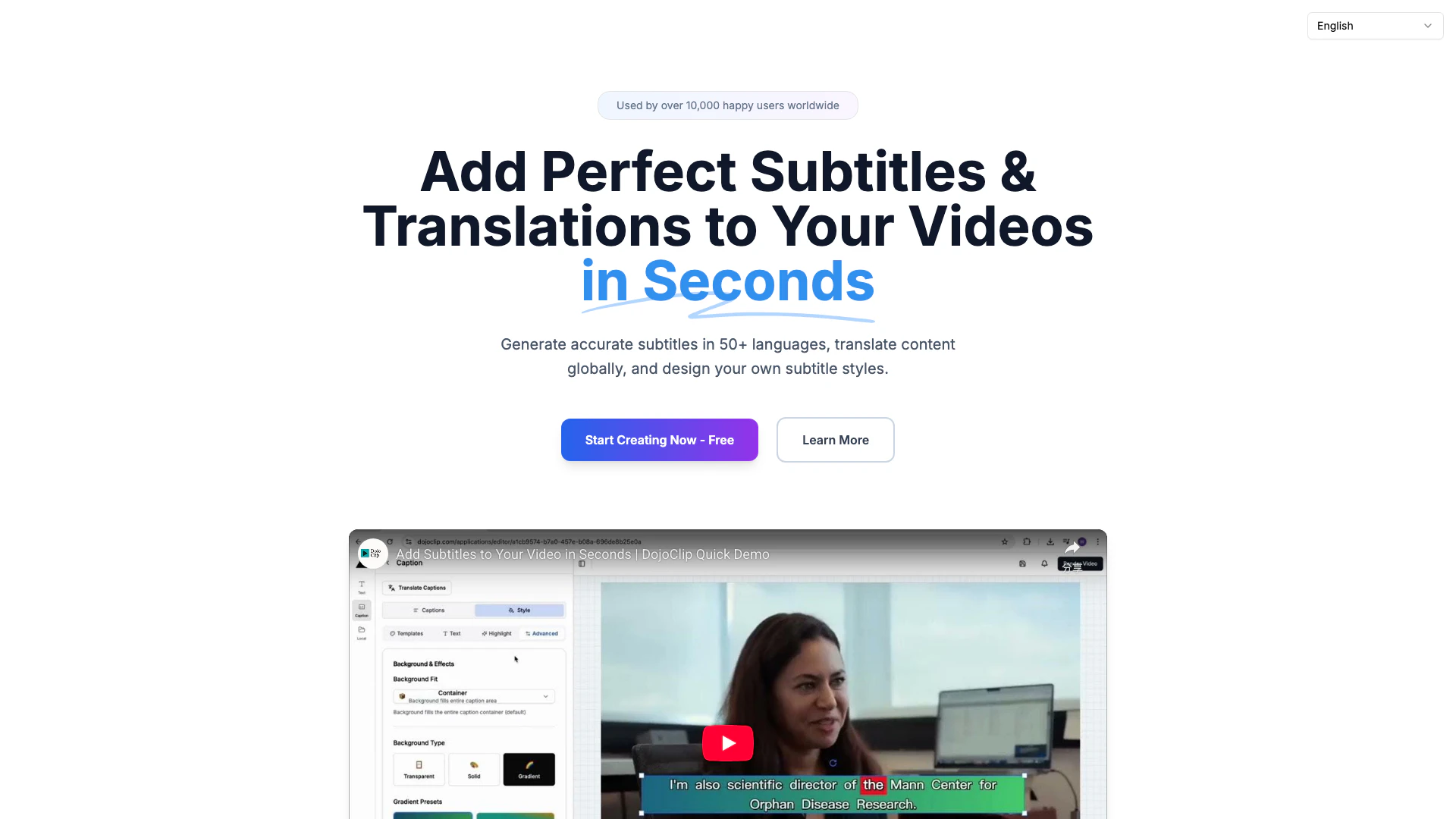
Dojoclip is a powerful AI-powered[1] video editor designed to streamline the video creation process. It offers unique features such as accurate subtitle generation[2] in over 50 languages and seamless translation capabilities, all without the need to upload files. This tool is tailored for creators who seek to enhance their video content with professional editing and multilingual support, making it a versatile solution for global audiences.
How to use Dojoclip?
- Visit the Dojoclip website and select the video editing tool you want to use.
- Choose your video file from your device without uploading it to the cloud.
- Use the AI-powered features to generate subtitles or translate your video content.
- Customize your subtitles and apply any desired editing effects.
- Preview your edited video and download it directly to your device.
What are the main features of Dojoclip?
- AI-Powered Subtitle Generation: Automatically create accurate subtitles in over 50 languages using advanced speech recognition[5] technology.
- Video Translation[3]: Translate your video content into multiple languages while maintaining timing and context for a seamless viewing experience.
- No Upload Required[4]: Edit videos directly from your device without the need for file uploads, ensuring privacy and convenience.
- Customizable Subtitle Styles: Design and personalize subtitle styles to match your video's theme and branding.
- Free Tools: Access a variety of free tools for trimming, audio extraction, video compression, and more, all without any costs or hidden fees.
Who is Dojoclip for?
Dojoclip is ideal for a wide range of users, including content creators, social media managers, educators, and marketing professionals. Whether you are a video editor looking for efficient tools, a teacher wanting to create engaging educational content, or a marketer aiming to reach global audiences, Dojoclip provides the necessary features to meet diverse video editing needs.
What are the use cases of Dojoclip?
- Social Media Marketing: Quickly create engaging video clips with subtitles for platforms like Instagram and TikTok, enhancing viewer engagement.
- Educational Content Creation: Educators can subtitle instructional videos in multiple languages, making learning accessible to a broader audience.
- Podcast Promotion: Use Dojoclip to generate subtitles for podcast highlights, making them shareable on social media and increasing reach.
Dojoclip Pros and Cons
Pros
- Multilingual Subtitle Generation: Generate accurate subtitles in over 50 languages using AI-powered speech recognition, making it easy to reach global audiences.
- User-Friendly Interface: Designed for ease of use, DojoClip allows users to create and edit videos without needing extensive technical knowledge.
- No Upload Required: All editing and subtitle generation can be done locally on your device without uploading files, ensuring privacy and security.
Cons
No cons data detected for this tool
Analytics of Dojoclip
Dojoclip Website Traffic Analysis
Visits Over Time
Traffic Sources
Nov 2025 - Jan 2026 Worldwide Desktop Only
- Direct: 46.91%
- Search: 40.49%
- Referrals: 7.16%
- Social: 3.90%
- Paid Referrals: 1.10%
- Mail: 0.12%
Top Keywords
| Keyword | Volume | CPC | Estimated Value |
|---|---|---|---|
| 视频去掉声音 | 0 | $0.00 | $190.00 |
| dojoclip | 380 | $0.00 | $340.00 |
| 视频合并 | 230 | $0.00 | $260.00 |
| 视频转图片 | 110 | $0.00 | $330.00 |
| 图片制作视频 | 110 | $0.00 | $200.00 |
Dojoclip Reviews
DojoClip is an essential tool we use every day at our agency. As a video content creator, my clients need everything from adding subtitles to translating videos for international audiences. DojoClip makes it possible for us to create incredible content that consistently exceeds expectations. The translation accuracy is what really sets it apart - we're always ready to create from anywhere!
DojoClip helps us spend less time learning complex video platforms and more time crafting stories that connect with our audience. We've used it to create engaging social media clips from our podcasts with automatic subtitles in multiple languages. The workflow is incredibly efficient. If you've used Canva for design, you'll love DojoClip for video.
This is probably the most important tool for me and my team. It's always there to meet our everyday needs in creating scroll-stopping videos. DojoClip is smart, fast, easy to use, and full of features that make our workflow more effective. The privacy features give us peace of mind when handling client content. We love it more each day!
For more reviews, visit this link: https://dojoclip.com/#user-reviews
Dojoclip Compare
| Tool Name | Introduction | Pricing | Type | Rating | Launch Date | Learn more |
|---|---|---|---|---|---|---|
 | Third Garden - AI-powered tools | Free | 💼Work | March 21, 2023 | Get deal | |
 | A comprehensive platform for seamless event management. | Free Trial | 💼Work🎨Creativity | June 1, 2024 | Get deal | |
 | Companion AI | Free | 🙋♂️Personal💼Work | August 12, 2023 | Get deal |
Info current as of post date. Offers and availability may vary by location and are subject to change.
Dojoclip Alternatives

PixVerse transforms your ideas into stunning AI-generated videos.
- Video & Animation
- AI Video Generator
- AI Text to Video
- AI Video Creation Suite
Veo 3.1 revolutionizes video generation with audio integration.
- Video & Animation
- AI Video Generator
- AI Image and Video Synthesis
- AI Creative Video Content Generator
- Video & Animation
- AI Video Editor
- AI Video Generator