
Studix



What is Studix?
Studix is an innovative AI-powered PDF reader[1] designed to enhance study efficiency by eliminating the cognitive burden of context switching. It allows users to interact with PDFs, generate quizzes, and summarize content within a single unified workspace. This tool is tailored to help students master subjects more effectively by minimizing distractions and maximizing focus. By integrating various study tools into one platform, Studix aims to reclaim the cognitive power lost during traditional studying methods, thus fostering deeper learning and understanding.
How to use Studix?
- Sign up for a free account on the Studix website to get started.
- Upload your PDF documents directly into the Studix platform.
- Utilize the AI-powered features:
- - Use the auto-detecting chapters feature to generate a smart Table of Contents for easy navigation.
- - Engage with the content by asking chapter-based questions to receive precise AI answers.
- - Take advantage of adaptive quizzes[3] to test your knowledge on specific sections of the PDF.
- Use the built-in focus tools like the Pomodoro timer to maintain productivity during study sessions.
- Mark up your PDFs using the freeform sketch and annotation tools to express your thoughts and ideas.
What are the main features of Studix?
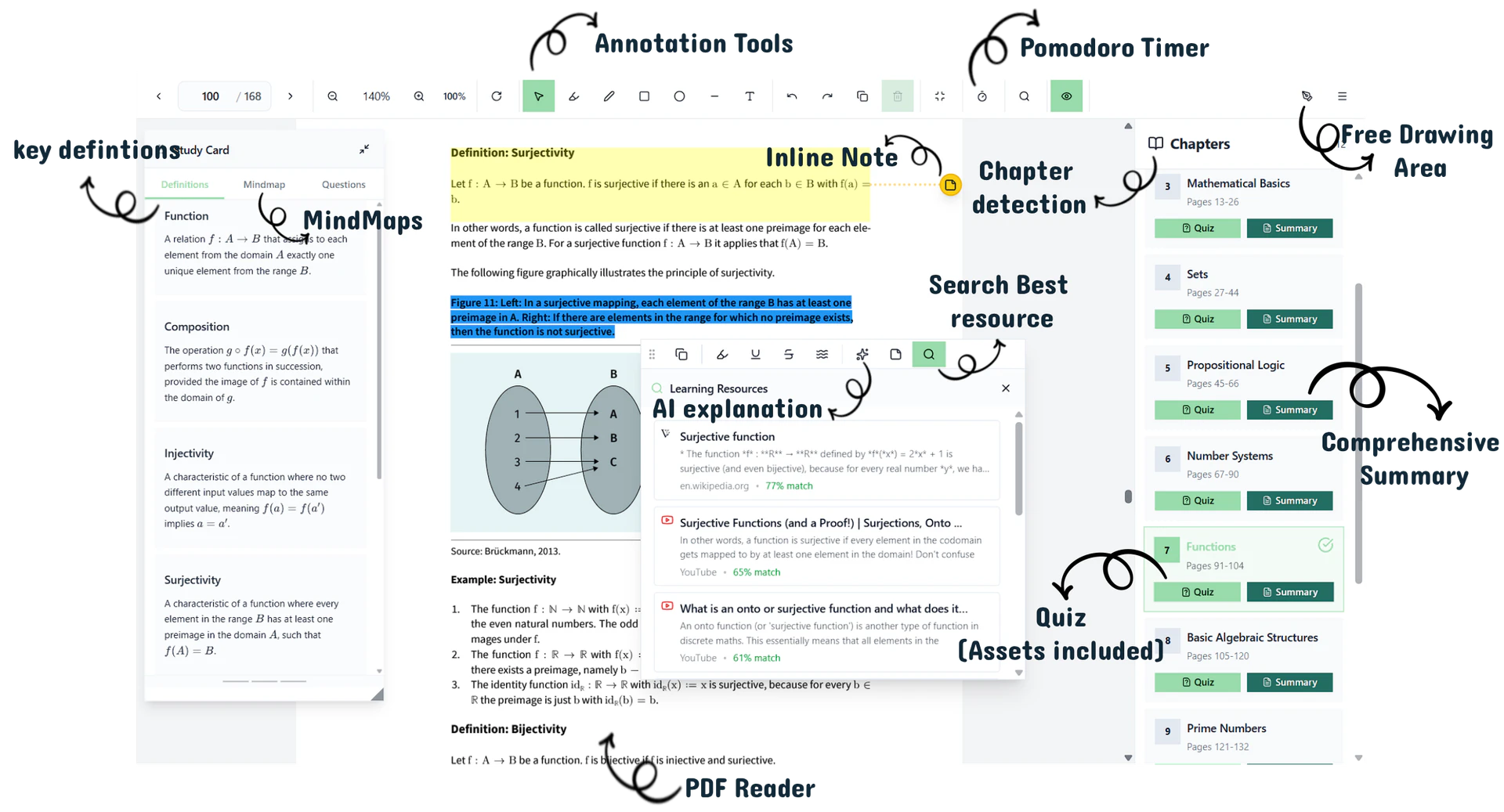
- AI-Powered PDF Reader: Seamlessly study and interact with PDFs without switching tabs.
- Smart Summaries[2]: Generate concise summaries of complex chapters in seconds.
- Adaptive Quizzes: Convert any page into a quiz to test your knowledge instantly.
- Floating Study Cards[4]: Access definitions and flashcards without losing your reading context.
- Visual Mindmaps[5]: Automatically visualize connections between concepts in your document.
- Chapter-Based Q&A: Ask specific questions related to the section you are studying for targeted answers.
- Deep Work Timer: Built-in Pomodoro timer to help maintain focus during study sessions.
- Pro Selection Tool: Inline AI toolkit for explanations, notes, and external resource searches.
Who is Studix for?
Studix is designed primarily for students and learners who want to enhance their study efficiency and mastery of subjects. It caters to individuals from high school to university levels, particularly those who frequently work with PDFs and require a focused study environment. Additionally, educators and professionals seeking to streamline their learning process and reduce cognitive overload will find Studix beneficial. Its features are tailored for anyone looking to improve their academic performance without the distractions of traditional study methods.
What are the use cases of Studix?
- Academic Study Sessions: Students can use Studix to study course materials efficiently by summarizing chapters and quizzing themselves on key concepts.
- Research Projects: Researchers can annotate PDFs and generate summaries to quickly grasp essential information from multiple sources.
- Exam Preparation: The adaptive quizzes and chapter-based Q&A features allow students to prepare for exams by focusing on areas that need improvement.
Product Images
Studix Pros and Cons
Pros
- Integrated AI Workspace: StudiX consolidates all study tools into one platform, eliminating the need for multiple applications and reducing cognitive load.
- Adaptive Quizzes: Users can instantly create quizzes from any page or chapter, allowing for effective knowledge verification and retention.
- Smart Summaries: AI-generated summaries provide quick access to core concepts, helping users grasp complex material efficiently.
Cons
No cons data detected for this tool
Studix Pricing
Free
For casual learners - 3 PDFs at a time (deletable) - 3 quizzes per month - 3 summaries per month - 25 explanations per month - 1 study plan per month - Unlimited notes - Priority support
Pro
For serious students who want A's - Unlimited PDF uploads - Access all chapters - Unlimited quizzes - Unlimited summaries - Unlimited explanations - Unlimited study plans - Priority support
For the latest pricing, please visit this link: https://studix.app/#pricing
Prices are subject to change. Please visit the official website for the most up-to-date pricing information.
Analytics of Studix
Studix Website Traffic Analysis
Visits Over Time
Traffic Sources
Jan 2026 - Jan 2026 Worldwide Desktop Only
- Direct: 100.00%
Top Keywords
| Keyword | Volume | CPC | Estimated Value |
|---|---|---|---|
| studix | 280 | $0.00 | $0.00 |
| studix.app | 270 | $0.00 | $10.00 |
| studix app | 250 | $0.00 | $0.00 |
Studix Compare
| Tool Name | Introduction | Pricing | Type | Rating | Launch Date | Learn more |
|---|---|---|---|---|---|---|
 | PhotoFairy | Welcome | Free | 💼Work🎨Creativity | March 20, 2023 | Get deal | |
 | Affordable online speech therapy for all ages. | Free | 💼Work | November 14, 1999 | Get deal | |
 |
AI Keyboard・ReplyAssistant on the App Store
| Free | 🙋♂️Personal💼Work | December 31, 1984 | Get deal |
Info current as of post date. Offers and availability may vary by location and are subject to change.
Studix Q&A
The Doorway Effect is a cognitive phenomenon where moving between different digital environments (like switching from your PDF to ChatGPT and then to Notion) causes your brain to "reset" its context. This results in a "Context Tax" that costs you up to 40% of your cognitive power. Studix eliminates this by keeping your entire workflow in one unified zone.
For more FAQs, please visit this link: https://studix.app/#faq
Studix Alternatives

OpusClip turns long videos into high-quality viral clips for you to share on TikTok, YouTube Shorts, and Reels to increase social media reach.
- Writing & Editing
- AI Content Repurposing
- AI Text Generator
- AI Social Media Tools

Inkflow | AI Book and Article Generator
- Writing & Editing
- AI Text Generator
- AI Content Checker
- AI SEO Tools
Scribble - Your AI Blog Writing Expert
- Writing & Editing
- AI Text Generator
- AI Writing Assistants
- AI Content Checker