

Pxlsafe





What is Pxlsafe?
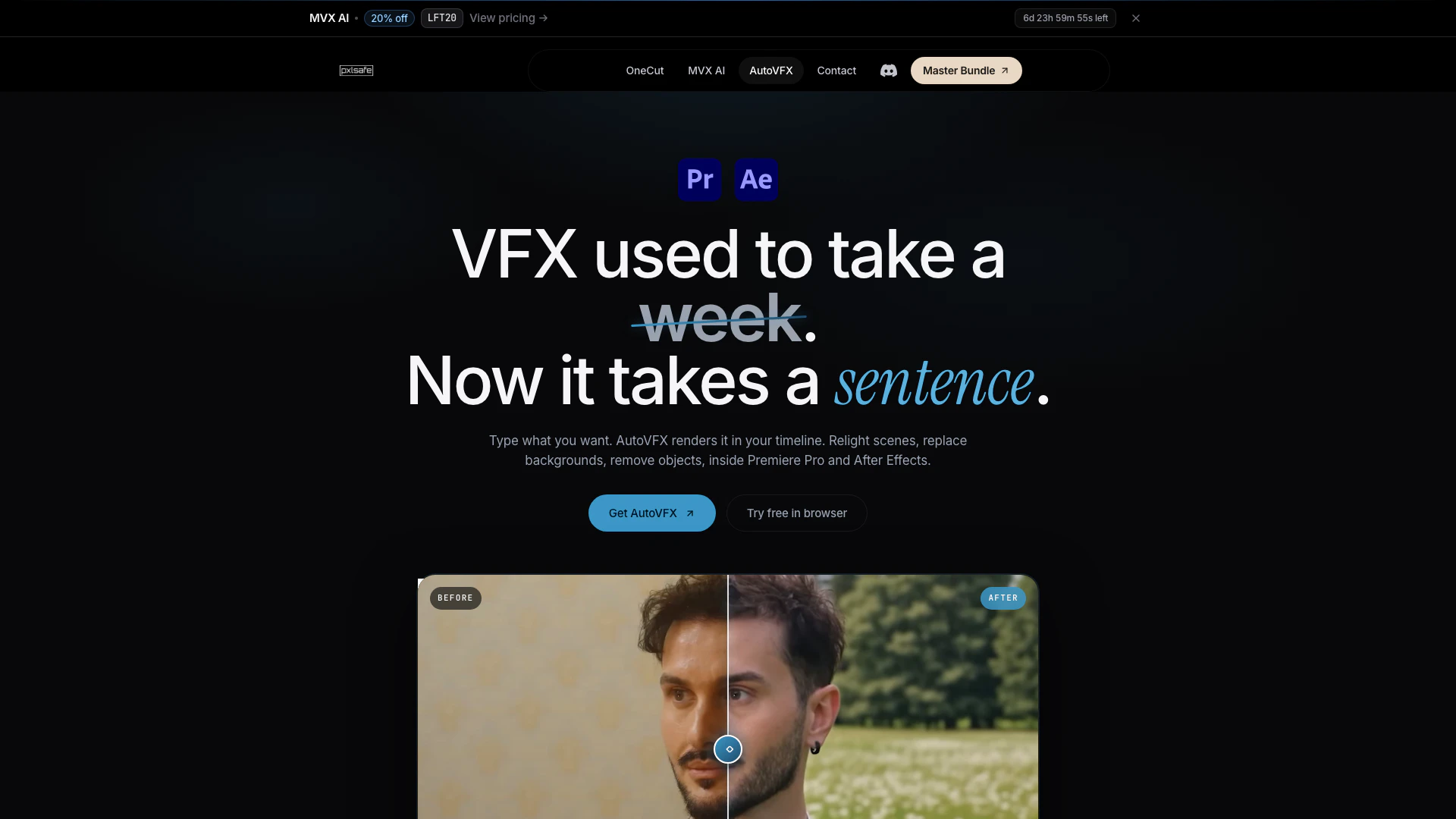
Pxlsafe is an innovative AI-powered plugin designed for video editors, specifically tailored for use within Adobe Premiere Pro and After Effects. The core functionality of Pxlsafe's AutoVFX tool allows users to manipulate video scenes effortlessly by simply typing commands in plain English. Whether you want to relight a scene, swap backgrounds, or remove unwanted elements, AutoVFX streamlines these processes, making complex visual effects accessible to all editors. With its intuitive interface, Pxlsafe empowers creators to enhance their projects without the need for extensive VFX knowledge, ultimately saving time and improving productivity.
How to use Pxlsafe?
- Send a clip to AutoVFX. Select the clip segment you wish to edit by marking the in and out points. AutoVFX will export this range and import it into the panel while keeping the rest of your timeline intact.
- Type what you want. Use plain English to describe the desired changes, such as 'replace the background with a grass field' or 'add a warm pink tone.' For more complex requests, you can also upload a reference image to guide the rendering process.
- Pick a mode and generate. Choose between modes like Auto, Relight, Background, or VFX based on your needs. The Auto mode will automatically determine the best workflow based on your prompt, while other modes allow for specific types of edits. Once processed, the rendered clip will return to your timeline in 4K resolution, ready for further grading.
What are the main features of Pxlsafe?
- User-Friendly Interface: Allows for quick editing by typing simple prompts.
- Multiple Editing Modes: Includes Auto, Relight, Background, and VFX modes to cater to various editing needs.
- Real-Time Rendering: Processes edits directly within Premiere Pro and After Effects, eliminating the need for exporting and reimporting.
- High-Quality Output: Delivers renders in 4K resolution, ensuring professional-grade results.
- Reference Image Support: Users can upload reference images to achieve desired looks more accurately.
Who is Pxlsafe for?
Pxlsafe is designed for video editors of all skill levels, from beginners to seasoned professionals. It is particularly beneficial for those working in fast-paced environments, such as music video production, commercial editing, and independent filmmaking. The tool is ideal for editors who wish to streamline their workflow, reduce the time spent on complex visual effects, and enhance their creative capabilities without needing extensive VFX expertise. Additionally, post-production houses looking to cut costs on freelance VFX work will find Pxlsafe to be a valuable asset.
What are the use cases of Pxlsafe?
- Music Video Production: Quickly change backgrounds and relight scenes to match the desired aesthetic, allowing for rapid editing of music videos.
- Commercial Editing: Efficiently remove unwanted elements or add special effects, helping to create polished advertisements without lengthy edits.
- Independent Filmmaking: Utilize Pxlsafe to enhance scenes with minimal effort, making it easier for filmmakers to achieve professional results on a budget.
Pxlsafe Pros and Cons
Pros
- Easy Scene Modification: AutoVFX allows users to modify scenes effortlessly by simply typing commands in plain English, making complex edits accessible to all skill levels.
- Multiple Editing Modes: The tool offers various modes such as Relight, Background, and VFX, allowing users to choose the best workflow for their specific editing needs.
- Seamless Integration with Premiere Pro: AutoVFX integrates directly with Premiere Pro and After Effects, enabling users to render and edit without the need for exporting and reimporting.
Cons
No cons data detected for this tool
Pxlsafe Pricing
Air
Billed monthly. Cancel anytime. 40 seconds of AI VFX / month. Premiere Pro & After Effects panel. All four modes: Auto, Relight, Background, VFX. macOS & Windows. Best fit for a few shots a month.
Starter
Billed monthly. Cancel anytime. 200 seconds of AI VFX / month. Premiere Pro & After Effects panel. All four modes: Auto, Relight, Background, VFX. macOS & Windows. Email support.
Pro
Billed monthly. Cancel anytime. 500 seconds of AI VFX / month. Everything in Starter. 2.5× the seconds at a lower per-second cost. Priority render queue. Faster support response. Early access to new modes.
For the latest pricing, please visit this link: https://www.pxlsafe.com/autovfx#pricing
Prices are subject to change. Please visit the official website for the most up-to-date pricing information.
Analytics of Pxlsafe
Pxlsafe Website Traffic Analysis
Visits Over Time
Top Regions
| Region | Percentage |
|---|---|
🇺🇸 United States | 41.24% |
🇮🇳 India | 27.89% |
🇫🇷 France | 17.78% |
🇩🇪 Germany | 6.71% |
🇮🇩 Indonesia | 6.39% |
- United States: 41.24%
- India: 27.89%
- France: 17.78%
- Germany: 6.71%
- Indonesia: 6.39%
Top Keywords
| Keyword | Volume | CPC | Estimated Value |
|---|---|---|---|
| mvx | 1.95K | $1.73 | $20.00 |
| autovfx | 800 | $0.00 | $270.00 |
| pxlsafe | 430 | $0.00 | $210.00 |
| auto vfx | 130 | $0.00 | $110.00 |
| pxlsafe mvx plugin | 70 | $0.00 | $60.00 |
Pxlsafe Compare


Info current as of post date. Offers and availability may vary by location and are subject to change.
Pxlsafe Q&A
Yes. AutoVFX is a real Adobe extension - it lives as a panel inside Premiere Pro and After Effects on both macOS and Windows. You pick a clip on your timeline, type a prompt, and the rendered result lands back on the same timeline. Nothing leaves the host app.
Pxlsafe Alternatives

CapCut is a comprehensive online creative suite for video editing and graphic design.
- Video & Animation
- AI Video Editor
- AI Video Creation Suite
- AI Creative Video Production

Kling AI empowers creators to generate stunning images and videos using advanced generative AI techniques.
- Image Generation & Editing
- AI Image Generator
- AI Video Generator
- AI Image and Video Synthesis
Veo 3.1 revolutionizes video generation with audio integration.
- Video & Animation
- AI Video Generator
- AI Image and Video Synthesis
- AI Creative Video Content Generator