

Klipse



What is Klipse?
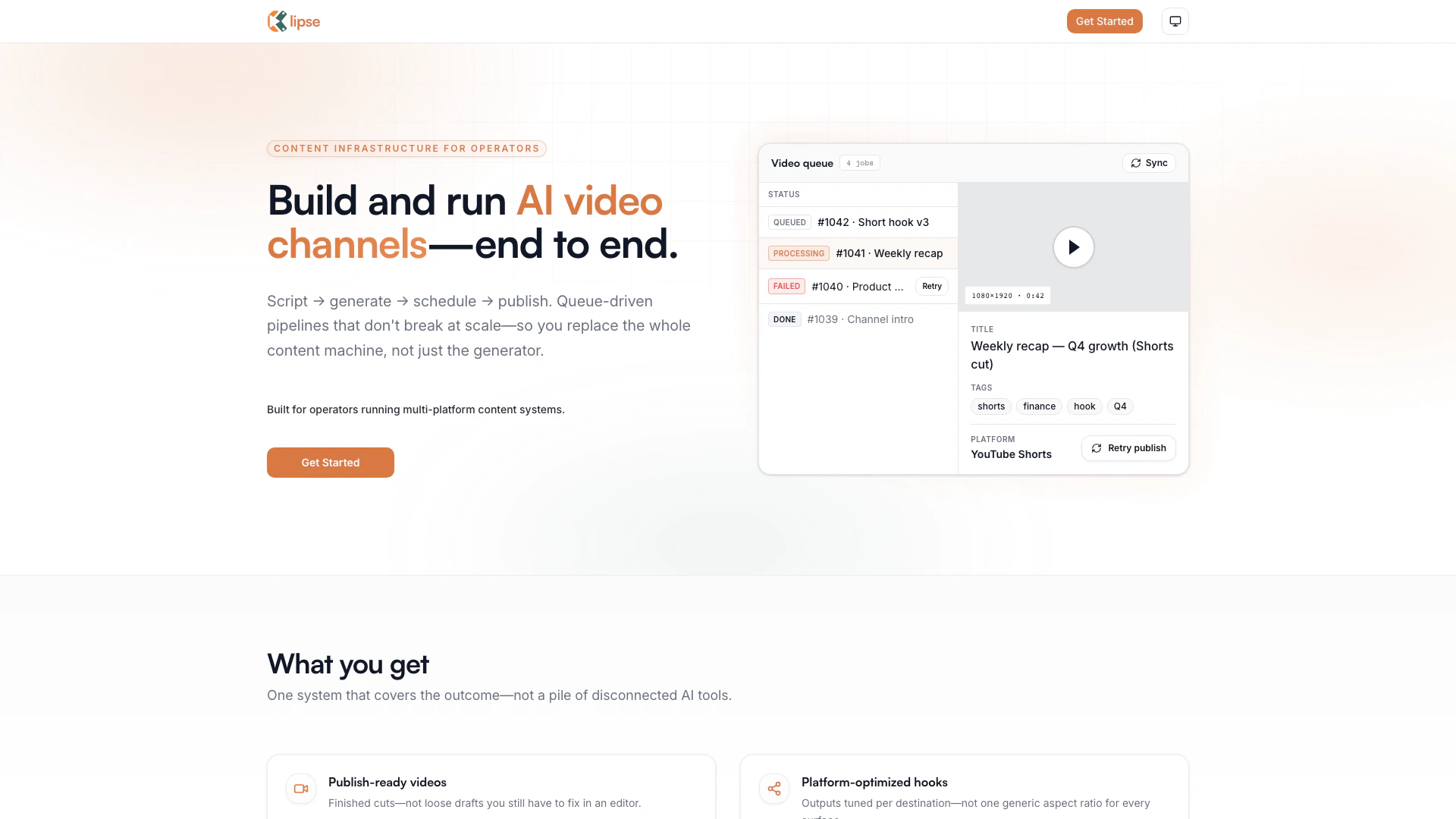
Klipse is an innovative queue-driven AI video pipeline designed specifically for content operators. It streamlines the entire process of video creation, from scripting to publishing, allowing users to build and manage AI video channels efficiently. With its platform-native workflows, Klipse ensures that every stage of video production is visible and manageable, making it a reliable solution for those who need to produce high volumes of video content without the typical pitfalls associated with scaling. The tool offers features like retries, hybrid pricing, and full pipeline visibility, making it a comprehensive choice for video content creators.
How to use Klipse?
- Sign up for an account on the Klipse website and choose a suitable pricing plan based on your video production needs.
- Input your script or video idea into the Klipse platform, which will serve as the blueprint for your content.
- Let Klipse generate the video scenes, voice, and visuals based on your input.
- Review the generated content and make any necessary adjustments or approvals.
- Schedule or publish your video to the desired platform, ensuring all metadata and disclosure requirements are met.
What are the main features of Klipse?
- Queue-driven video pipelines that ensure reliability and scalability.
- Full visibility into every stage of video production, including job status and failures.
- Platform-optimized outputs tailored for various social media channels.
- Scheduled distribution to ensure videos are published at optimal times.
- Retry mechanisms that allow users to fix issues without restarting the entire process.
- Hybrid pricing model combining subscription and credits for flexible usage.
Who is Klipse for?
Klipse is designed for content operators and creators who manage multi-platform video channels and require a reliable, scalable solution for producing video content. It caters to solo operators, small teams, and larger networks that need to streamline their video production processes while maintaining high-quality output. Whether you are a marketer, social media manager, or content creator, Klipse provides the necessary tools to efficiently handle video creation and distribution.
What are the use cases of Klipse?
- Creating engaging social media content for platforms like YouTube Shorts and Instagram Reels.
- Producing regular video updates or recaps for businesses and organizations to share with their audience.
- Automating video production workflows for teams managing multiple channels to save time and resources.
Klipse Pros and Cons
Pros
- End-to-End Video Pipeline: Klipse offers a complete solution for video production, from scripting to publishing, ensuring a streamlined workflow for operators.
- Queue-Driven Architecture: The queue-first design allows jobs to survive restarts and provides visibility into the status of each job, reducing downtime and improving efficiency.
- Platform-Native Workflows: Klipse generates content optimized for specific platforms, ensuring that titles, tags, and metadata meet the requirements of each destination.
Cons
No cons data detected for this tool
Klipse Pricing
Free
1 video for lifetime, Max 30 sec, No auto-post, Expires after 24h, Queue priority: lowest, Models: cheapest only.
Starter
~1,500 credits (~60 shorts), 1 channel, Max 30 sec videos, Auto-post (YouTube only), Basic analytics, Standard queue priority, No watermark, Email support, Ability to buy more credits.
Creator
~5,000 credits (~200 shorts or mixed), 3 channels, Max 60 sec videos, Auto-post + scheduling, Manual approval toggle, Better TTS + visuals, Medium queue priority.
Empire
~15,000 credits (~600 shorts or mixed), 10 channels, Long-form support, Priority rendering, Premium models (Kling, Google TTS priority), Advanced analytics (future-ready), Highest queue priority.
For the latest pricing, please visit this link: https://klipse.app/
Prices are subject to change. Please visit the official website for the most up-to-date pricing information.
Klipse Compare
| Tool Name | Introduction | Pricing | Type | Rating | Launch Date | Learn more |
|---|---|---|---|---|---|---|
Writesonic: AI Agents for SEO, Content & Generative Engine Optimization (GEO) | Free | -- | January 13, 2021 | Get deal | ||
Papercup - Premium AI Dubbing | Free | -- | February 28, 1999 | Get deal | ||
Descript: Edit Videos & Podcasts Like a Doc | AI Video Editor | Free | -- | December 31, 1984 | Get deal |


Info current as of post date. Offers and availability may vary by location and are subject to change.
Klipse Alternatives

CapCut is a comprehensive online creative suite for video editing and graphic design.
- Video & Animation
- AI Video Editor
- AI Video Creation Suite
- AI Creative Video Production

PixVerse transforms your ideas into stunning AI-generated videos.
- Video & Animation
- AI Video Generator
- AI Text to Video
- AI Video Creation Suite
Veo 3.1 revolutionizes video generation with audio integration.
- Video & Animation
- AI Video Generator
- AI Image and Video Synthesis
- AI Creative Video Content Generator