

Pdftovideoai
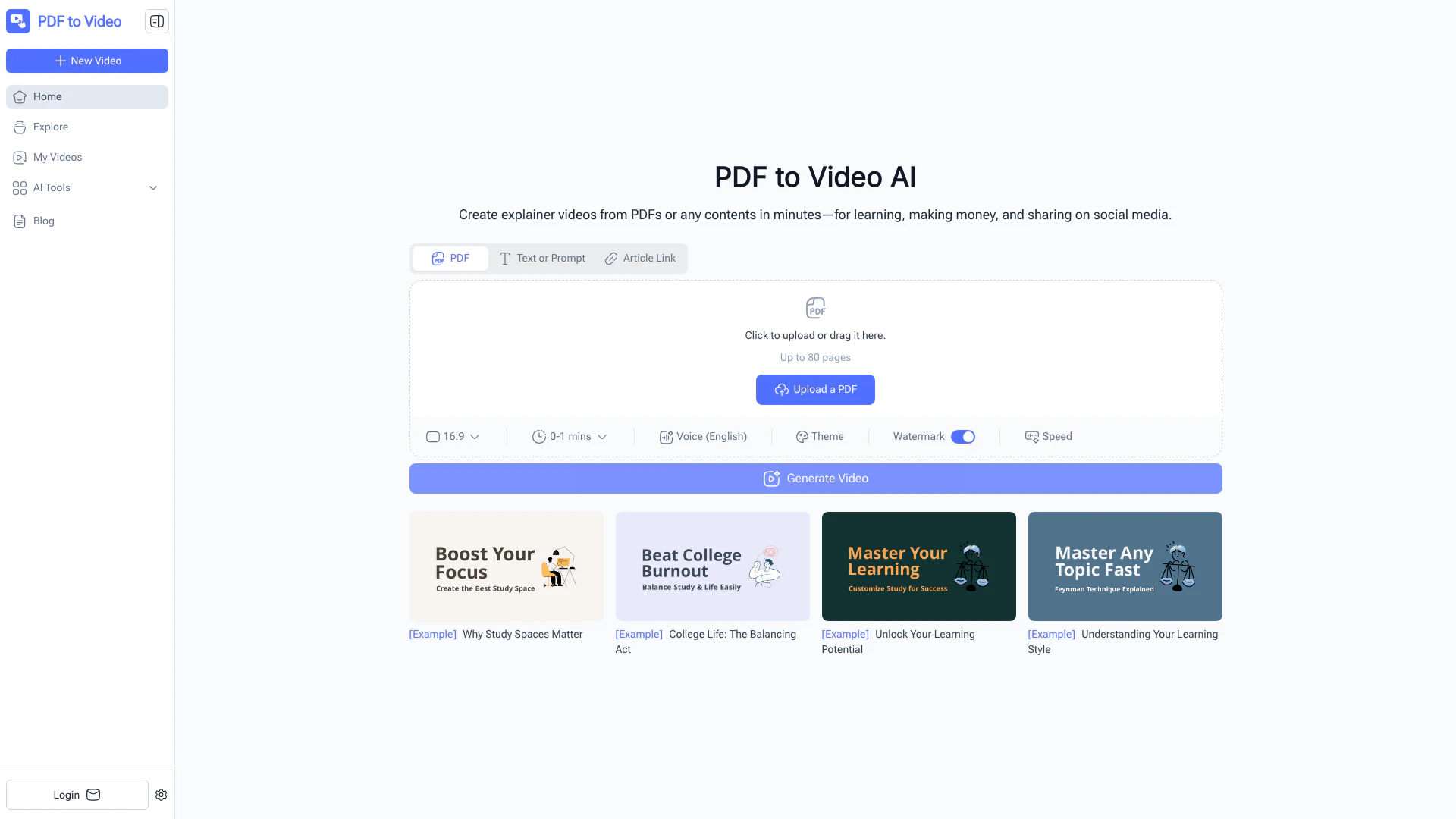





What is PDF to Video AI?
PDF to Video AI is an innovative online tool that converts various content formats such as PDFs, URLs, and documents into engaging videos. This AI-powered converter allows users to transform static materials into dynamic visual presentations, making it ideal for learning, marketing, and social media sharing. With its user-friendly interface, no sign-up requirement, and fast processing, PDF to Video AI makes it simple for anyone to create professional-quality videos from their content.
How to use PDF to Video AI?
- Upload Your PDF: Drag and drop your PDF document or select it from your device to initiate the conversion process.
- AI Creates Your Video: The AI engine analyzes the content, including text and images, and generates a video with scenes, animations, and narration.
- Download & Share: Make any necessary edits, then export your final video to download or share it online instantly.
What are the main features of PDF to Video AI?
- AI-Powered Conversion: Automatically transforms your PDF content into videos.
- No Sign-Up Needed: Start using the tool immediately without creating an account.
- Free & Online: Access the service anytime via your browser without any costs.
- Customizable Output: Adjust voiceovers, timing, and design elements to fit your needs.
- Fast & Efficient: Convert your documents into videos within minutes.
- Professional Quality: Produce videos that look professionally edited.
Who is PDF to Video AI for?
PDF to Video AI is designed for a diverse audience, including: - Teachers & Trainers: To convert lesson materials into interactive videos. - Business Professionals: For presenting reports and proposals in an engaging format. - Marketers: To create quick video ads or explainers from brochures. - Students: To turn notes into study-friendly video content. - Content Creators: To transform PDFs into shareable videos efficiently. - Nonprofits: To enhance awareness campaigns through visual storytelling.
What are the use cases of PDF to Video AI?
- Educational Videos: Teachers can create engaging video lessons from their teaching materials.
- Marketing Content: Marketers can quickly generate promotional videos from product brochures.
- Training Manuals: Businesses can convert training documents into interactive video guides for employees.
Pdftovideoai Pros and Cons
Pros
- AI-Powered Video Conversion: Automatically transforms PDFs and documents into engaging videos using AI, requiring no editing skills.
- Instant Access Without Sign-Up: Users can start converting PDFs to videos immediately without the need for account creation.
- Free and Online Service: Offers a completely free online service to convert PDFs into videos anytime, directly from a browser.
- Customizable Video Output: Allows users to adjust voiceovers, timing, and design elements to fit their preferences.
- Fast Video Generation: Converts PDFs into shareable videos in just minutes, enhancing productivity.
Cons
No cons data detected for this tool
Pdftovideoai Pricing
Free Plan
Convert PDFs into videos anytime, directly from your browser. No sign-up needed. Fast and efficient.
For the latest pricing, please visit this link: https://pdftovideo.ai/
Prices are subject to change. Please visit the official website for the most up-to-date pricing information.
Analytics of Pdftovideoai
Pdftovideoai Website Traffic Analysis
Visits Over Time
Traffic Sources
Nov 2025 - Jan 2026 Worldwide Desktop Only
- Direct: 33.63%
- Search: 30.20%
- Mail: 19.85%
- Social: 9.64%
- Referrals: 5.52%
- Paid Referrals: 0.96%
Top Keywords
| Keyword | Volume | CPC | Estimated Value |
|---|---|---|---|
| pdf to video | 7.24K | $0.48 | $180.00 |
| pdf to video ai | 1.91K | $2.84 | $420.00 |
| pdftovideo | 220 | $0.00 | $120.00 |
| pdftovideo.ai | 130 | $0.00 | $120.00 |
| how to convert pdf to video for free: step-by-step guide in 2025 | 50 | $0.00 | $50.00 |
Pdftovideoai Reviews
PDF to Video turned my training manual into a professional video in minutes. I didn’t have to learn any complicated software — the AI handled everything.
I use PDF to Video for creating quick marketing explainers from our product brochures. It saves me hours of work.
As a teacher, I love how PDF to Video makes my lesson materials more engaging for students.
For more reviews, visit this link: https://pdftovideo.ai#user-reviews
Pdftovideoai Compare
| Tool Name | Introduction | Pricing | Type | Rating | Launch Date | Learn more |
|---|---|---|---|---|---|---|
 | AudioDiary | Free | 🙋♂️Personal | April 7, 2023 | Get deal | |
 | Design lifelike chat mockups for various messaging apps. | Free | 🎨Creativity | January 3, 2026 | Get deal | |
 | CreativeMagicPanel - Retouching Panel for Photoshop. | Free | 💼Work🎨Creativity | February 17, 2022 | Get deal |
Info current as of post date. Offers and availability may vary by location and are subject to change.
Pdftovideoai Q&A
Yes, PDF to Video is completely free to use online, with no sign-up required.
Pdftovideoai Alternatives

Kling AI empowers creators to generate stunning images and videos using advanced generative AI techniques.
- Image Generation & Editing
- AI Image Generator
- AI Video Generator
- AI Image and Video Synthesis

PixVerse transforms your ideas into stunning AI-generated videos.
- Video & Animation
- AI Video Generator
- AI Text to Video
- AI Video Creation Suite

PixVerse | Create Amazing AI Videos from Text & Photos with AI Video Generator
- Art & Design
- AI Design Generator
- AI Video Generator
- AI Image to Video